
AI Music Prompt Examples: A Genre-by-Genre Library You Can Copy and Paste
Every AI music generator from text reads the same kind of brief: a short description naming genre, mood, tempo, instruments and vocal style. Suno’s own knowledge base confirms that detailed style instructions — not vague one-word moods — are what separate a forgettable clip from a track worth keeping.

This page is a copy-paste library of ready AI music prompts, sorted by genre and mood. Each one is broken down by slot, so you can see exactly why it works and swap in your own instruments or theme.
What Is an AI Music Prompt?
An AI music prompt is a text description of the track you want: genre, atmosphere, instruments, emotion. Modern text-to-music AI tools turn that description into audio in under a minute — Suno, for example, typically renders a full two-to-four-minute track in roughly 30 to 60 seconds once the prompt is submitted. Two very different pipelines sit behind that speed, and knowing which one you’re talking to changes how you should write.
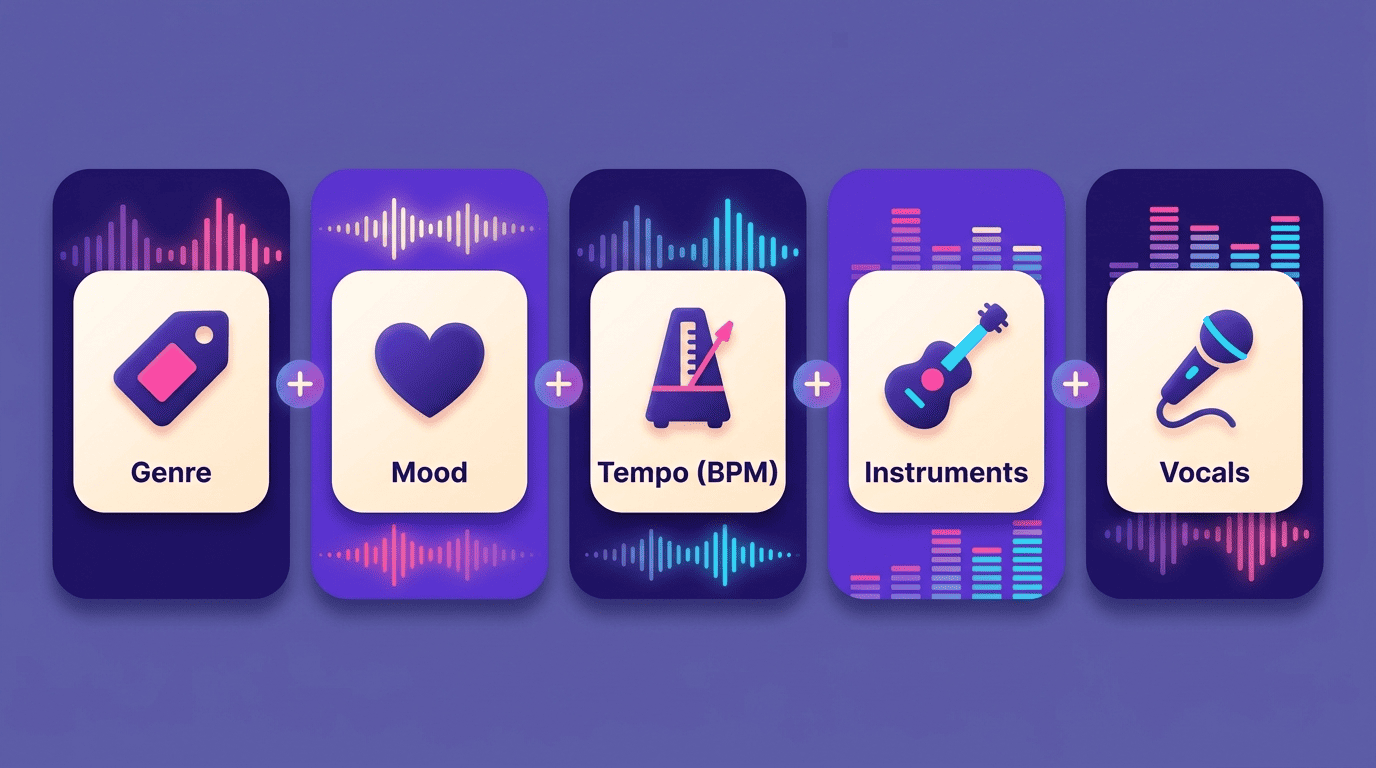
A prompt is not a search query — it’s closer to a brief you’d hand a session musician. The model has no taste of its own, so every word you skip becomes a guess it makes on your behalf. The more of the five slots (genre, mood, tempo, instruments, vocals) you fill in, the fewer wrong guesses it can make.
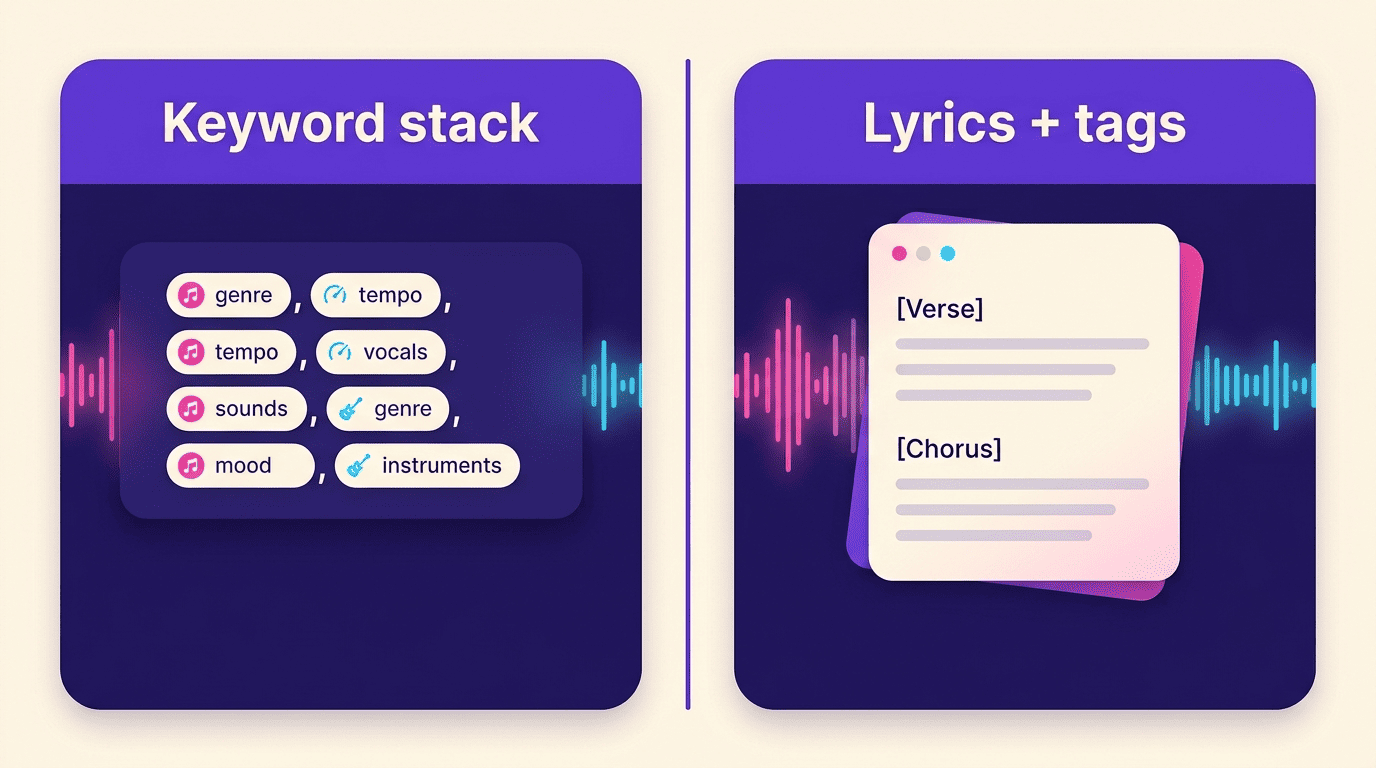
Keyword-stacking generators — Stable Audio, Meta’s MusicGen, MusicFX — expect short, comma-separated tag lists with no vocals: genre, mood, tempo, instruments, done. Lyrics-and-tags generators — Suno, Udio — expect a full lyric sheet marked up with structure tags, plus a short separate style box that carries the genre and mood description. The prompts in this library work for both; where they differ, the entry says so.
The Anatomy of a Great Prompt
Every prompt example on this page is built from the same five slots, in the same order, whether it ends up in a Stable Audio tag list or a Suno style box.
| Slot | What to write | Example fill-in |
|---|---|---|
| Genre & style | Named genre or sub-genre | “Lo-fi hip-hop,” “80s synthwave” |
| Mood/emotion | The feeling, not the music theory | “Nostalgic,” “euphoric,” “intimate” |
| Tempo (BPM) | A number, not “fast” or “slow” | 90 BPM, 128 BPM |
| Instrumentation | Specific instruments, not “band” | “Rhodes piano,” “supersaw leads” |
| Vocals/theme | Voice type, or “no vocals,” plus subject | “Female vocals, theme of self-confidence” |
The five building blocks
Stacked together in this order, the five slots read like a full brief:
- Genre & style
- Mood/emotion
- Tempo (BPM)
- Instrumentation
- Vocals/theme
Example: “Upbeat pop song, 120 BPM, catchy chorus, bright synths, female vocals, theme of self-confidence.” Every genre-specific prompt below follows this same order.
How long should it be?
The practical sweet spot is 20–60 words. Under 10 words, the model is filling in most of the track from statistical defaults; over 80, some of your detail gets ignored outright, and stacking two conflicting genres in one prompt tends to blur the result into neither one.
Length matters more than eloquence here. A tight 30-word prompt that hits all five slots will consistently outperform a flowery 100-word paragraph that buries the tempo and instruments in adjectives.
Vague vs. specific — a before/after
| Version | Prompt |
|---|---|
| Vague | “Make a happy song” |
| Specific | “Upbeat indie-pop, 118 BPM, jangly guitars, warm female vocals, sunny nostalgic mood, handclaps in the chorus” |
The vague version leaves genre, tempo, instruments and vocals entirely to chance. The specific version answers all five slots in one sentence — that’s the gap this whole library is built to close.
Prompts by Genre (Copy-Paste Library)
Nine genres, each broken into its slots. Copy the quoted prompt as-is, or swap the instrument and mood words for your own track.
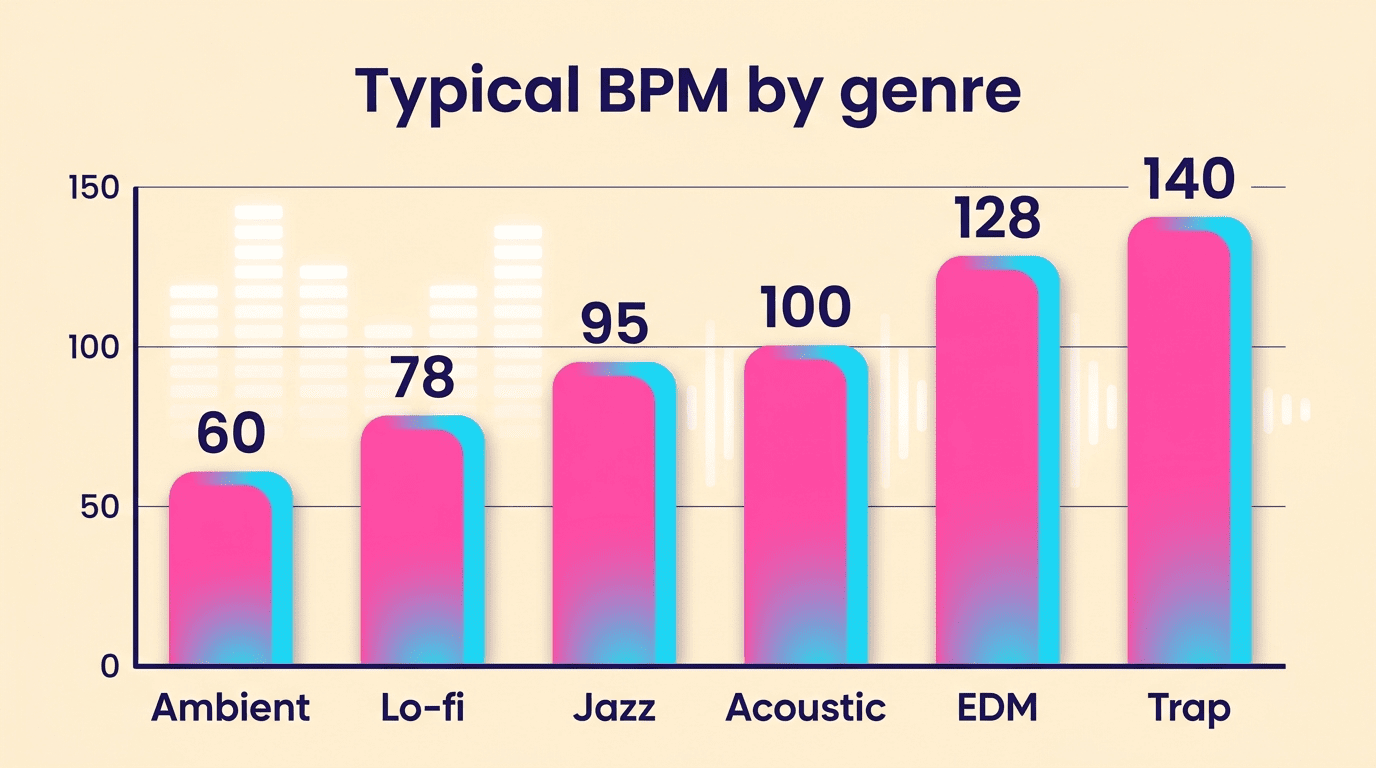
Lo-fi / chillhop. “Lo-fi hip-hop beat, 78 BPM, dusty vinyl crackle, mellow Rhodes piano, soft boom-bap drums, rainy late-night study mood, no vocals.” Genre: lo-fi hip-hop. Tempo: 78 BPM. Instruments: Rhodes piano, boom-bap drums, vinyl crackle texture. Mood: rainy, late-night, no vocals.
Cinematic / soundtrack. “Epic cinematic score, 90 BPM, swelling strings, deep brass, taiko drums, triumphant hopeful mood, building to a climax.” Adding a dynamic cue like “building to a climax” gives structure-aware generators a shape to follow, not just a static texture.
EDM / house / synthwave. “Festival EDM drop, 128 BPM, four-on-the-floor kick, supersaw leads, sidechained bass, euphoric high-energy mood.” A second option for a different feel: “80s synthwave, 110 BPM, neon analog synths, gated reverb drums, nostalgic night-drive mood.”
Acoustic / folk. “Warm acoustic folk, 100 BPM, fingerpicked steel-string guitar, soft brushed drums, intimate storytelling mood, gentle male vocals.”
Ambient / meditation. “Ambient meditation loop, 60 BPM, evolving warm pads, distant piano, soft field-recording textures, calm weightless mood, no drums, no vocals.”
Rock / metal. “Driving alt-rock, 130 BPM, distorted power chords, punchy live drums, gritty energetic mood, anthemic male vocals in the chorus.”
Pop. “Catchy dance-pop, 128 BPM, bright plucky synths, punchy bass, airy female vocals, confident summer mood, hooky chorus.”
Hip-hop / trap / boom bap. “Boom-bap hip-hop, 90 BPM, gritty sampled drums, jazzy piano loop, vinyl crackle, classic 90s feel.” For a harder-edged version: “Modern trap, 140 BPM, booming 808s, rapid hi-hats, dark moody atmosphere.”
Jazz / blues. “Smooth late-night jazz, 95 BPM, brushed drums, upright bass, muted trumpet, mellow saxophone, warm intimate club mood.”
Prompts by Mood & Emotion
Sometimes the starting point isn’t a genre — it’s a feeling you want the track to carry. These four prompts lead with mood and let the genre follow.
- Uplifting / hopeful — “Hopeful piano-led instrumental, 105 BPM, rising strings, gentle arpeggios, bright optimistic build.”
- Melancholy / nostalgic — “Melancholic indie ballad, 72 BPM, reverb-soaked electric guitar, soft pads, bittersweet nostalgic mood, fragile female vocals.”
- Dark / cinematic tension — “Dark hybrid trailer cue, 80 BPM, pulsing low synth, dissonant strings, industrial percussion, ominous rising tension.”
- Romantic / warm — “Warm romantic R&B, 85 BPM, smooth electric piano, soft bass, silky male vocals, intimate candle-lit mood.”
Structure Tags for Song Sections (Suno & Udio)
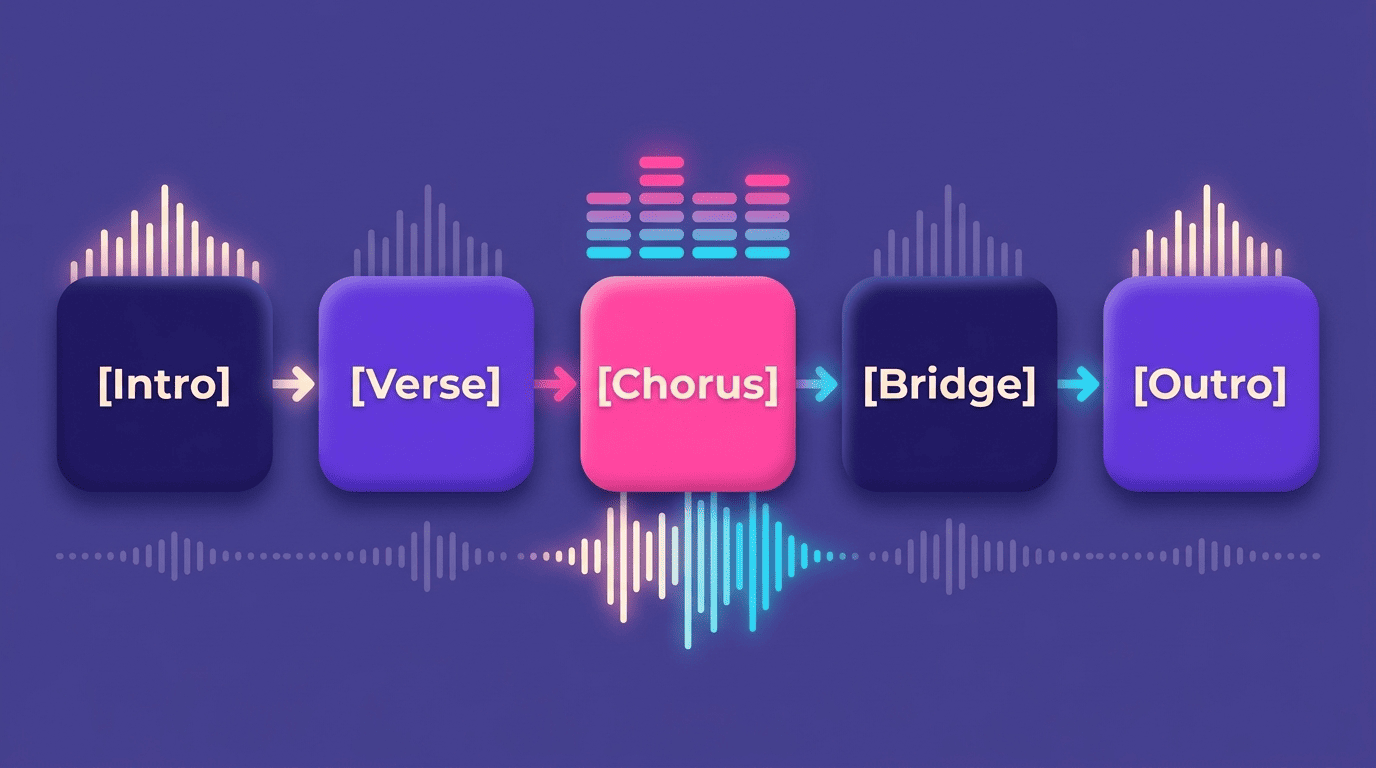
Genre and mood tags shape the sound of a track. Structure tags shape its form — where the verse ends, where the hook lands, where the track builds and fades.
The tag vocabulary
[Intro] [Verse] [Pre-Chorus] [Chorus] [Bridge] [Instrumental] [Solo] [Hook] [Drop] [Outro], plus performance hints like [Build], [Fade Out], and [Whispered]. Each tag goes on its own line directly above the lyrics for that section — Suno’s own guidance on writing lyrics recommends adding this kind of context straight in the lyrics box rather than leaving structure to chance.
Keyword-stacking tools like Stable Audio and MusicGen skip structure tags entirely — there’s no lyric sheet to mark up, so the track’s shape comes from dynamic language in the main prompt itself, phrases like “building to a climax” or “sudden drop at the midpoint.”
Two rules that trip people up
- Using parentheses instead of square brackets — parentheses are typically read as ad-lib backing vocals, not structure cues, so
(Chorus)won’t behave like[Chorus]. - Changing the chorus wording between repeats — a
[Chorus]tag with different lyrics each time can pull the melody along with it, breaking the hook’s repetition. Keep the text identical if you want the same melody back.
Common Mistakes & How to Refine
Two habits separate a prompt that needs three regenerations from one that lands on the first or second try.
Don’t name artists — describe them
Artist and band names are blocked by most text-to-music AI tools on copyright grounds. Trade the name for the genre, mood, and vocal qualities it represents:
- “Sounds like Drake” → “hip-hop, trap, laid-back male vocals”
- “Sounds like Adele” → “soulful pop ballad, powerful female vocals, piano-led”
- “Sounds like Daft Punk” → “French house, filtered disco samples, robotic vocoder vocals”
Refine one variable at a time
- Generate a first pass from your five-slot prompt.
- Listen for the one element that’s off — tempo, instrument mix, energy.
- Change only that variable: “add light percussion,” “acoustic instruments only,” or “slower, 90 BPM.”
- Regenerate and compare against the previous version.
- Repeat until the track matches the brief, adjusting no more than one or two slots per pass.
Meta’s own model card for MusicGen is candid about why this iterative loop matters in the first place. As the researchers put it:
It is sometimes difficult to assess what types of text descriptions provide the best generations. Prompt engineering may be required to obtain satisfying results.
MusicGen Model Card, Meta AI
That’s true across tools, not just MusicGen — Stability AI’s own Stable Audio user guide documents the same tag-based approach for keyword-stacking prompts, and it rewards the same one-variable-at-a-time refinement.